
For spaces scanned on or after 1 April 2024, the Metaroom Workspace displays the North Heading orientation within the 3D room model. This is especially useful for light planners and designers, as it shows how natural light behaves at different times of the day.
Where can I see the North Heading orientation in the Metaroom Workspace?
The North Heading indicator is visible within the opened 3D room scene in the Metaroom Workspace. As you rotate the 3D model, the North Heading icon dynamically adjusts its position to reflect the current orientation.
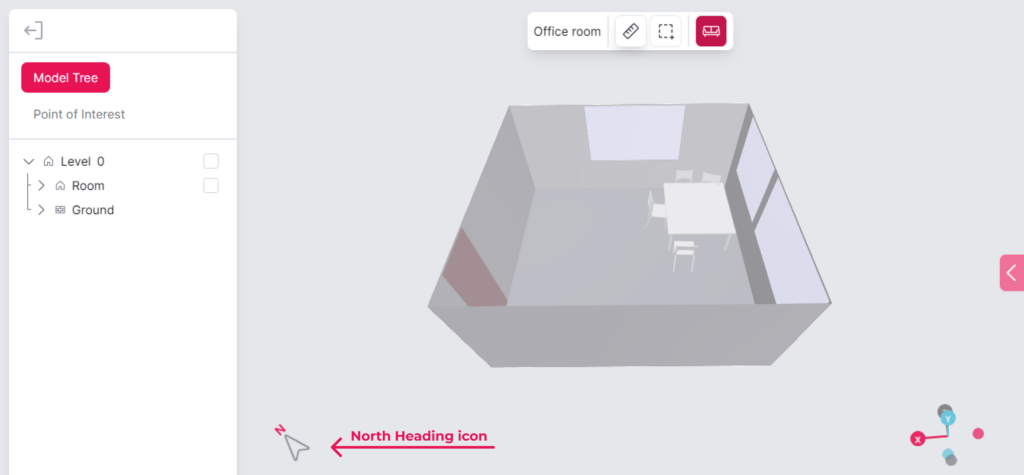
Please note: the North Heading feature is available on the desktop browser of the Metaroom Workspace only — it is not accessible via mobile browsers.
Which export formats support North Heading data?
North Heading data is included in the following export formats:
- .PDF 2D Project Report
- .PDF 2D Floor Plan
- .PDF 2D Floor Plan Simplified
- .RDF (Relux Desktop)
- .IFC 2×3
- .IFC 4
- .IFC (Ranplan)
- .IFC (Palette CAD)
- .IFC (SirkBIM)
- .IFC (Autodesk Revit)
Considerations for North Heading accuracy
Spatial planners should be mindful of potential sources of interference that may affect their accuracy, such as electromagnetic fields. Inserting a SIM card into your Apple Pro device during the scan process might help alleviate these inaccuracies. However, the feature still remains operational even without one.


